---
title: "Aura Services Page Template: Agency Positioning, Process, and Project Inquiries"
description: Win client projects with the Aura Services page template—services grid, hiring process timeline, trust stats, and contact CTAs for HubSpot CMS agencies.
image: https://blog.chetankumar.me/hubfs/Aura%20Theme/Aura%20Blog%20Featured%20images/09-services-template-featured.png
---
[Skip to content](https://blog.chetankumar.me/aura-blog/aura-services-page-template-guide#main-content)
[](https://blog.chetankumar.me/aura-home)
- [Features](https://www.chetankumar.me/aura-features)
- [Product](https://www.chetankumar.me/aura-product)
- [Services](https://www.chetankumar.me/aura-services)
- [Pricing](https://www.chetankumar.me/aura-pricing)
- Landing Pages
- [General LP](https://www.chetankumar.me/aura-landing)
- [Demo Request LP](https://www.chetankumar.me/aura-demo-request-lp)
- [Webinar LP](https://www.chetankumar.me/aura-webinar-lp)
- [Product Launch LP](https://www.chetankumar.me/aura-product-launch-lp)
- [Ebook Download LP](https://www.chetankumar.me/aura-ebook-download-lp)
- [App Waitlist LP](https://www.chetankumar.me/aura-app-waitlist-lp)
- [Blog](https://blog.chetankumar.me/aura-blog)
- [Style Guide](https://blog.chetankumar.me/aura-style-guide)
[Documentation](https://blog.chetankumar.me/aura-documentation)
1.
2. [Aura Blog](https://blog.chetankumar.me/aura-blog)
3. [Aura Theme Template](https://blog.chetankumar.me/aura-blog/tag/aura-theme-template)
4. Aura Services Page Template: Agency Positioning, Process, and Project Inquiries
[Aura Theme Template](https://blog.chetankumar.me/aura-blog/tag/aura-theme-template)
# Aura Services Page Template: Agency Positioning, Process, and Project Inquiries

[Chetan](https://blog.chetankumar.me/aura-blog/author/chetan)
Published Jun 26, 2026
10 min read
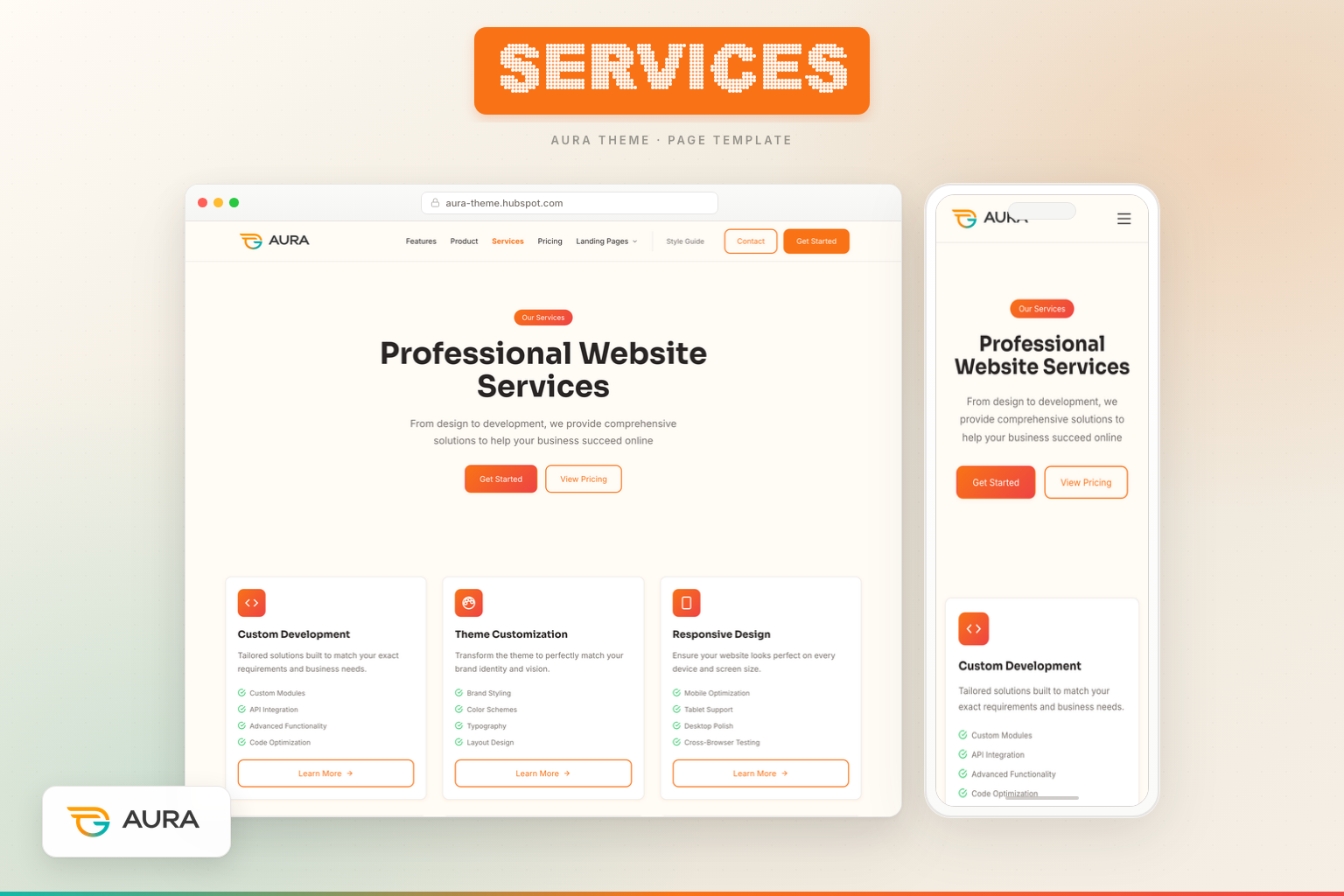
Services pages are where agencies and professional sellers translate capability into revenue. Generic "What We Do" paragraphs do not win RFPs—structured service catalogs, transparent process timelines, credibility metrics, and clear project CTAs do. The **Aura Services page template** packages all four into five sections powered by modules you will not find on standard HubSpot boilerplates: Services Grid, Hiring Process, and Services Trust.
## Business objectives of a Services page
- **Clarify offerings** — What you sell, who it is for, what is included
- **Demonstrate process** — How engagements run from discovery to launch
- **Build credibility** — Stats, certifications, project counts
- **Generate inquiries** — Route to Contact or case studies
Path: `templates/Services.html`. DnD area: **Services**. CSS: `aura-services-sections.css`.
## Section 1: Hero with CTAs — commercial intent immediately
Centered **Aura Hero** with buttons: Get Started → Contact, View Pricing → Pricing. Unlike About hero, Services hero drives action—visitors here are closer to purchase.
## Section 2: Services Grid Module — six offerings
The **Aura Services Grid module** displays six service cards:
- Custom Development
- Theme Customization
- Responsive Design
- Performance Optimization
- SEO Services
- Training & Support
Each card includes icon, description, four feature bullets, and Learn More CTA link.
**Module benefits:**
- Repeater fields for unlimited services
- Per-card CTA links to detail pages or anchor sections
- Consistent card height and typography via Aura tokens
- Mobile-responsive grid without horizontal scroll
**Objective fulfilled:** Buyers scanning RFP alternatives compare service breadth in seconds. Six clear cards beat paragraph prose.
## Section 3: Hiring Process Module — process transparency
Four numbered steps via **Aura Hiring Process module**:
1. Discovery — goals, audience, requirements
2. Planning — architecture, timeline, milestones
3. Development — build, review, iterate
4. Launch — deploy, train, support handoff
Visual timeline with connectors and step badges.
**Why process sections win deals:** Enterprise and mid-market buyers fear unknown workflows. Showing steps reduces perceived risk and aligns expectations before the first invoice.
**Note:** Module name references hiring process styling, but content adapts perfectly to client engagement workflows—rename step titles in module fields.
## Section 4: Services Trust Module — credibility stack
**Aura Services Trust module** combines:
- Heading: "Expertise You Can Trust"
- Four checklist items (Certified HubSpot Developers, Award-Winning Designs, etc.)
- Primary CTA: Start Your Project
- Four stat cards: Projects Delivered, Client Retention, Years Experience, Team Members
**Objective:** Convert skeptics who agree you offer the right services but doubt you can deliver. Stats + certifications + checklist = triangulated trust.
## Section 5: CTA Banner — close with dual paths
Orange gradient full-bleed banner: "Ready to Get Started?" with Contact Us and View Case Studies → Case Study template.
**Case study linkage:** Services claims require proof. Case Study template provides narrative evidence—always link them together in nav and CTAs.
## Services page vs Features page
| Services | Features |
| --- | --- |
| You deliver work | Product includes capabilities |
| Process timeline | Component inventory |
| Project stats | Technical specs |
| Contact CTAs | Pricing / Style Guide CTAs |
## Connecting to About
Services pages sell what you do; About pages sell who you are. Prospects often visit both in one session—Services first for scope, About second for trust.
Explore team, values, and story modules in our [Aura About page template guide](https://blog.chetankumar.me/blog/aura-about-page-template-guide) to ensure brand narrative matches service claims.
## SEO keywords
"HubSpot CMS development services," "HubSpot theme customization agency," "HubSpot website optimization." Include location modifiers if serving regional clients.
## Launch checklist
1. Replace generic service bullets with deliverable-specific scope
2. Align process steps with your actual SOW template
3. Verify stat numbers against CRM or portfolio data
4. Point Learn More links to case studies or service detail anchors
5. Sync hero CTAs with Contact form routing rules
6. Add schema for ProfessionalService if local SEO applies
## Editing the Services template in the HubSpot page editor
Agency services pages require accurate scope definitions—misaligned cards create SOW disputes. Configure Aura Services template as follows:
1. **Create the page** — Website Pages → Create → Website page.
2. **Assign Services template** — Select "Services" from Aura theme. Five sections load in Services DnD area.
3. **Configure hero with CTAs** — Unlike About hero, Services hero includes buttons: Get Started → Contact, View Pricing → Pricing. Commercial intent from first viewport.
4. **Edit Services Grid module** — Six service cards via repeater: icon, title, description, four feature bullets each, Learn More link per card. Add/remove services as offerings evolve.
5. **Customize Hiring Process module** — Four numbered steps with titles and descriptions. Rename from "hiring" language to client engagement workflow (Discovery, Planning, Development, Launch).
6. **Update Services Trust module** — Checklist items (certifications, awards), primary CTA, four stat cards (projects, retention, years, team size).
7. **Set CTA Banner links** — Contact Us → Contact page. View Case Studies → Case Study template or portfolio index.
8. **Verify mobile grid layouts** — Six service cards must remain scannable on phone without horizontal scroll.
## Mobile and responsive behavior on the Services template
Services buyers often research agencies on mobile between meetings—responsive clarity drives inquiry form submissions.
**Hero with CTAs:** Centered layout. Dual CTAs stack on mobile. Buttons full width below 576px for easy thumb reach.
**Services Grid module:** Six cards reflow from 3-column desktop to 2-column tablet to 1-column mobile. Each card includes four bullet features—on mobile, cards become lengthy; consider tightening bullet copy to three lines max. Learn More links remain tappable with adequate spacing.
**Hiring Process module:** Horizontal timeline on desktop becomes vertical step stack on mobile. Numbered badges and connector lines adapt—verify step order readable when stacked. Step titles should remain visible without horizontal scroll.
**Services Trust module:** Checklist and stat cards reflow. Four stat cards move from 4-column to 2×2 to single column. Primary CTA ("Start Your Project") prominent above or below stats depending on module layout setting.
**CTA Banner (orange gradient):** Full-bleed on mobile. Dual CTAs stack vertically. Orange gradient distinct from demo landing teal and promo neon—signals commercial/agency context.
## Theme Settings fields that affect the Services page
**Colors:** Service card icons use accent token. Process step badges use primary background with contrast text. Services Trust stat numerals use heading color token. CTA Banner orange gradient may use secondary accent or custom module override—coordinate with brand palette.
**Typography:** Service card titles use heading scale. Process step titles semibold for scanability. Trust checklist uses body size with icon alignment consistent across items.
**Buttons:** Hero CTAs, Services Trust primary CTA, service card Learn More links, and banner buttons share button token family—primary for main actions, text or secondary for Learn More links depending on module config.
## Extended module field reference for the Services template
**Aura Hero (with CTAs):** Badge, headline, subheading, primary CTA + link, secondary CTA + link, centered layout.
**Aura Services Grid:** Section heading, subheading optional, service repeater (icon, title, description rich text, feature bullet repeater \[4 items recommended\], CTA label, CTA link), column layout, card style.
**Aura Hiring Process:** Section heading, step repeater (step number auto or manual, title, description, icon optional), timeline style, background token.
**Aura Services Trust:** Heading, checklist repeater (icon, text), primary CTA label + link, stat repeater (value, label), layout options.
**Aura CTA Banner:** Heading, subheading optional, primary + secondary CTAs, orange gradient full-bleed style variant.
## Common mistakes to avoid on your Services page
- **Vague service descriptions** — "We do web stuff" loses to competitors with scoped deliverables. Specify what's included per card.
- **Process steps that don't match SOW** — Sales promises Discovery in step 1 but SOW skips it. Align page with contract template.
- **Unverifiable stats** — "500+ projects" must be defensible. Use CRM-exported numbers.
- **Learn More links to 404** — Each service card CTA needs destination—case study, anchor, or Contact with pre-filled subject.
- **Missing case study connection** — Services claims without proof feel hollow. CTA Banner must link live case studies.
- **Copying Features page language** — Services sells your labor; Features sells product capabilities. Different voice required.
- **No Contact routing rules** — Hero Get Started floods generic inbox. Route by service interest field in form.
## Persona-specific use cases
**For marketers:** Services page targets bottom-funnel keywords ("HubSpot CMS development," "theme customization agency"). Track hero CTA clicks and Contact conversions from Services page source. Use in paid search for high-intent agency keywords. Coordinate service card copy with Google Ads landing message match. Refresh stats quarterly from project management exports.
**For developers:** Services Grid repeater supports unlimited cards—add specialized offerings (HubL custom modules, CRM integrations) without code changes. Hiring Process module timeline is CSS-driven—avoid inline style overrides. Link Learn More to documentation you maintain for repeatable deliverables.
**For agency owners:** Services page is your digital capabilities deck. RFP evaluators compare service breadth—six clear cards beat competitors' paragraph pages. Process module reduces sales cycle by pre-explaining engagement flow. Trust module backs pitch claims with numbers. White-label Aura Services for sub-brands by cloning page per vertical (SaaS vs e-commerce vs nonprofit).
## Additional SEO and internal linking guidance
Services pages compete for high-value local and vertical keywords. Include geography in copy if serving regional clients ("HubSpot agency Austin"). The existing link to the About guide ensures blog readers understand team/trust context; on live sites, cross-link Services ↔ About ↔ Contact ↔ Case Studies in footer and inline CTAs.
Service card Learn More links should use descriptive anchor text ("HubSpot theme customization examples") not "Learn more." Add ProfessionalService schema if local SEO applies. Blog posts about client work should link to Services page as commercial CTA.
## Proposal and SOW alignment workflow
Services page content should mirror your Statement of Work template—discrepancies create legal and sales friction. Map each Services Grid card bullet list to SOW deliverable section. Hiring Process module steps should match project phases in your PM tool (Asana, Monday, ClickUp). When scoping new projects, link prospects to specific service card during discovery call—"This engagement maps to our Custom Development offering"—then send SOW referencing same language. Services Trust stats must match proposal boilerplate numbers. Quarterly audit: compare page copy to last five signed SOWs for drift.
## Pipeline metrics for services inquiries
Track Services page as revenue source in HubSpot. Measure hero CTA clicks, Services Trust CTA clicks, and CTA Banner conversions. Benchmark inquiry-to-proposal rate. Review which service card Learn More links get most clicks—invest content in highest-demand offerings.
## Client onboarding alignment
Update Services Grid quarterly based on highest-margin offerings, not just inquiry volume.
## RFP and proposal integration
Export Services page URL in RFP responses as capabilities reference. Include screenshot of Services Grid in pitch decks—visual catalog beats bullet lists in competitive evaluations. When prospects ask "what do you offer?", send Services link before scheduling discovery call—they arrive prepared, shortening sales cycle. Align proposal service names exactly with Services Grid card titles to prevent scope confusion during contracting.
Add the Services page to new client onboarding packets alongside the SOW—when clients reference "the six services on your website," everyone shares the same scope definition from day one.
Review Services page heatmaps quarterly—if one card dominates clicks, consider promoting that offering in homepage hero or paid campaigns to capitalize on proven demand.
## Final word
The Aura Services page template turns agency positioning into a repeatable asset. Services Grid catalogs capability. Hiring Process module demystifies delivery. Services Trust module backs promises with numbers. CTA Banner captures intent. Publish it, pair it with Case Studies and Contact, and stop losing projects to competitors whose services page looks more serious than yours.
[#Aura Theme Template](https://blog.chetankumar.me/aura-blog/tag/aura-theme-template)
Share:
[LinkedIn](https://www.linkedin.com/sharing/share-offsite/?url=https%3A%2F%2Fblog.chetankumar.me%2Faura-blog%2Faura-services-page-template-guide) [X](https://twitter.com/intent/tweet?url=https%3A%2F%2Fblog.chetankumar.me%2Faura-blog%2Faura-services-page-template-guide&text=%3Cspan+id%3D%22hs_cos_wrapper_name%22+class%3D%22hs_cos_wrapper+hs_cos_wrapper_meta_field+hs_cos_wrapper_type_text%22+style%3D%22%22+data-hs-cos-general-type%3D%22meta_field%22+data-hs-cos-type%3D%22text%22+%3EAura+Services+Page+Template%3A+Agency+Positioning%2C+Process%2C+and+Project+Inquiries%3C%2Fspan%3E) [Email](mailto:?subject=%3Cspan+id%3D%22hs_cos_wrapper_name%22+class%3D%22hs_cos_wrapper+hs_cos_wrapper_meta_field+hs_cos_wrapper_type_text%22+style%3D%22%22+data-hs-cos-general-type%3D%22meta_field%22+data-hs-cos-type%3D%22text%22+%3EAura+Services+Page+Template%3A+Agency+Positioning%2C+Process%2C+and+Project+Inquiries%3C%2Fspan%3E&body=Check+out+this+article%3A+https%3A%2F%2Fblog.chetankumar.me%2Faura-blog%2Faura-services-page-template-guide)
Copy link

About the author:
## Chetan
Full-Stack Developer
[More articles →](https://blog.chetankumar.me/aura-blog/author/chetan) [LinkedIn](https://www.instagram.com/chetaverse)
## Table of Contents
Table of Contents
## Built to scale. Built to profit.
We help B2B teams turn traffic into pipeline with conversion-focused HubSpot experiences.
- 98% Client Retention + Growth
- 82% Average Client Profit Growth
- HubSpot CMS launch in weeks
[Book a Call](https://blog.chetankumar.me/aura-contact)
## Case Studies
- How Acme grew pipeline 3x
- SaaS launch in 14 days
- Enterprise migration story
## Keep Building — Explore More Setup Guides
### [ Setup Guide Aura Home Page Template: The Complete Guide to Building a High-Converting HubSpot Homepage  Chetan Jun 26, 2026, 5:20:09 PM](https://blog.chetankumar.me/aura-blog/aura-home-page-template-guide)
### [ Aura Theme Template Aura About Page Template: Build Trust, Tell Your Story, and Convert Candidates  Chetan Jun 26, 2026, 5:18:01 PM](https://blog.chetankumar.me/aura-blog/aura-about-page-template-guide)
### [ Aura Theme Template Aura Pricing Page Template: Transparent Plans, Enterprise Upsell, and Conversion-Ready Design  Chetan Jun 26, 2026, 5:17:11 PM](https://blog.chetankumar.me/aura-blog/aura-pricing-page-template-guide)
## Enjoyed This Article?
Explore Aura and start building your next website with a modern HubSpot theme.
[View Pricing](https://blog.chetankumar.me/aura-pricing) [Contact Us](https://blog.chetankumar.me/aura-contact)
[](https://blog.chetankumar.me/)
A premium, highly customizable HubSpot CMS theme built with modern design tokens and a comprehensive component library.
-
-
-
-
-
### Product
- [Home](https://blog.chetankumar.me/aura-home)
- [Features](https://blog.chetankumar.me/aura-features)
- [Product](https://blog.chetankumar.me/aura-product)
- [Pricing](https://blog.chetankumar.me/aura-pricing)
- [Use Cases](https://blog.chetankumar.me/aura-use-case)
### Company
- [About](https://blog.chetankumar.me/aura-about)
- [Team](https://blog.chetankumar.me/aura-team)
- [Contact](https://blog.chetankumar.me/aura-contact)
- [Careers](https://blog.chetankumar.me/aura-careers)
- [Blog](https://blog.chetankumar.me/aura-blog)
### Resources
- [Documentation](https://blog.chetankumar.me/aura-documentation)
- [Case Study](https://blog.chetankumar.me/aura-case-study)
- [FAQ](https://blog.chetankumar.me/aura-faq)
- [Services](https://blog.chetankumar.me/aura-services)
- [Support](https://blog.chetankumar.me/aura-contact)
### Legal
- [Privacy Policy](https://blog.chetankumar.me/privacy)
- [Terms of Service](https://blog.chetankumar.me/terms)
- [Download Theme](https://ecosystem.hubspot.com/marketplace/website/aura-theme-by-chetan-kumar)
- [Live Chat](https://wa.me/7409598846)
© 2026 Aura Theme. All rights reserved.
[kumarchetan.npr@gmail.com](mailto:kumarchetan.npr@gmail.com) · Built with care for the HubSpot Marketplace
```json
{
"@context" : "https://schema.org",
"@type" : "BlogPosting",
"author" : {
"@type" : "Person",
"name" : "Chetan",
"url" : "https://blog.chetankumar.me/aura-blog/author/chetan"
},
"dateModified" : "2026-06-26T11:38:51.996Z",
"datePublished" : "2026-06-26T10:30:02.000Z",
"headline" : "Aura Services Page Template: Agency Positioning, Process, and Project Inquiries",
"image" : [ "https://blog.chetankumar.me/hubfs/Aura%20Theme/Aura%20Blog%20Featured%20images/09-services-template-featured.png" ],
"mainEntityOfPage" : {
"@id" : "https://blog.chetankumar.me/aura-blog/aura-services-page-template-guide",
"@type" : "WebPage"
},
"publisher" : {
"@type" : "Organization",
"logo" : {
"@type" : "ImageObject",
"url" : "https://blog.chetankumar.me/hubfs/appstore.png"
},
"name" : "Chetan Kumar Company"
}
}
```